
Conversion Rate by Source
The metric that separates traffic from customers. See which sources send buyers, not just browsers.
TRAFFIC SOURCE ANALYSIS
Sessions, conversions, and conversion rate by traffic source, with trends over time. Some sources drive volume. Others drive buyers. This view shows you which is which.
Google Analytics tells you which sources send the most sessions. But sessions don't pay invoices. A traffic source that sends 10,000 visitors with a 0.2% conversion rate is worth less than one that sends 500 visitors with a 5% rate. Without conversion rate by source, you're optimizing for traffic, not transactions.
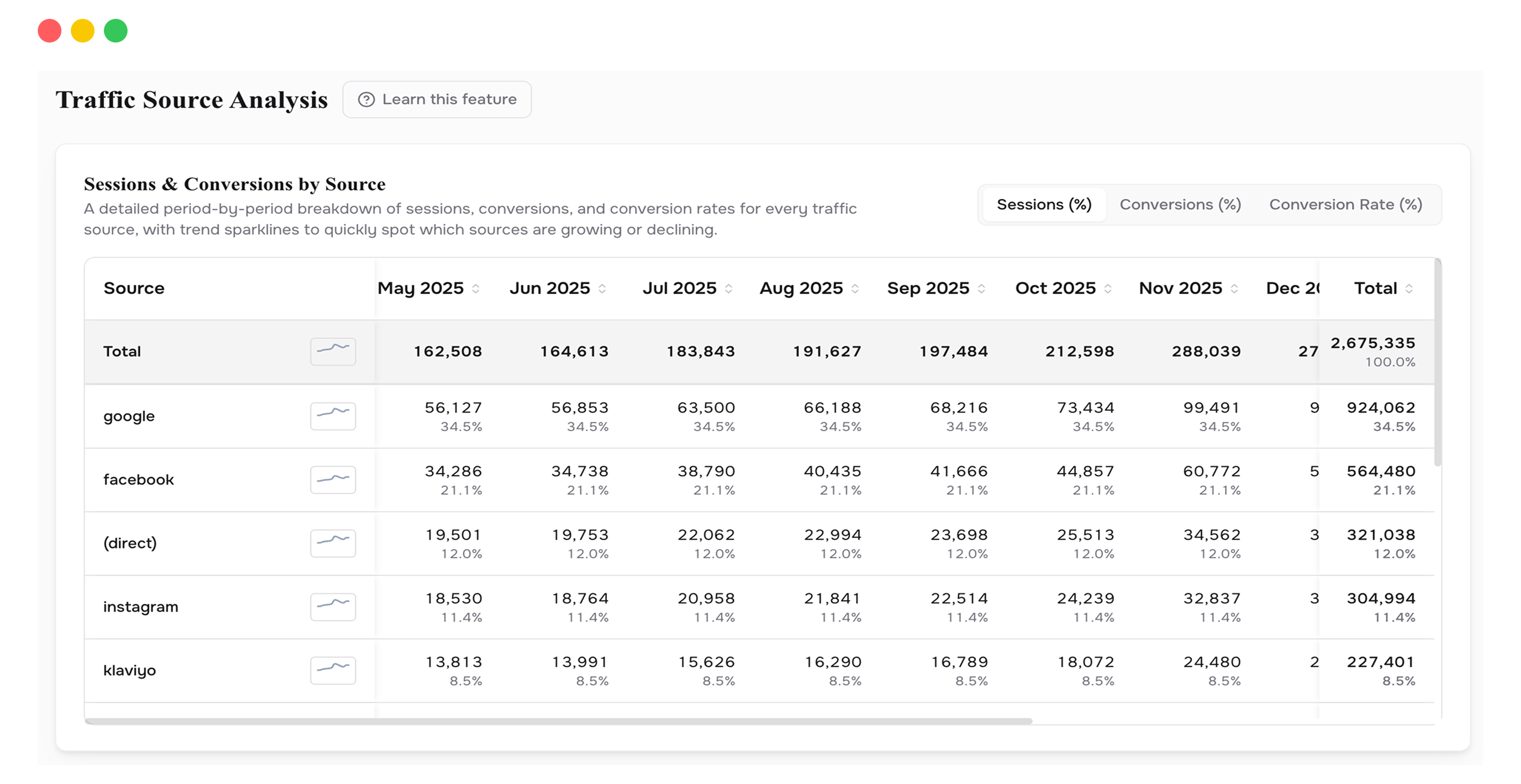
Traffic Source Analysis plots your traffic sources over time across three dimensions: sessions, conversions, and conversion rate. Your top 5 sources are highlighted automatically so you can see which ones are growing and which are stalling. You can switch between source-level detail (google, facebook, email) and channel-level grouping (Paid Search, Organic, Direct).
Below the charts, a detailed table breaks down every source by period. You can see exactly how many sessions each source delivered, how many of those became purchases, and what percentage converted. The trend data makes it clear whether a source is improving, declining, or flat, so you know which ones deserve more investment and which ones to reconsider.
The metric that separates traffic from customers. See which sources send buyers, not just browsers.
Three dimensions of source performance tracked over time.
Toggle between granular sources (google, facebook) and broader channels (Paid Search, Direct). Different questions need different lenses.
Your highest-performing sources are selected by default. Switch to custom to compare specific ones.
Pick any combination of sources to plot together. Compare organic vs. paid, email vs. social, or any matchup that matters.
Built on your Google Analytics 4 data for accurate, cookieless attribution.
The most valuable insight on this page isn't which source sends the most traffic. It's which source has the highest conversion rate. A small source with a 5% conversion rate is, dollar for dollar, five times more efficient than a large source at 1%. If you're allocating budget by session volume, you're likely over-investing in high-traffic, low-conversion sources and under-investing in the opposite.
Find the sources with the highest conversion rates and check whether you can scale them. A 5% conversion source that you haven't invested in is your biggest opportunity.
If a source's sessions are steady but conversions are dropping, the problem isn't traffic. It's something on the landing page or in the checkout funnel for that audience. The chart makes the divergence obvious.
Direct and branded organic traffic usually converts well because those visitors already know you. Paid and non-branded organic converts lower. Grouping by channel separates these so you don't conflate retention-driven traffic with true acquisition.
If organic from a specific source converts well but delivers low volume, invest in content for that channel. If a paid source converts well at low spend, test scaling it. The data tells you which levers exist.
This page requires Google Analytics 4 to be connected. Visit the Integrations page and link your GA4 property. Data will populate after the initial sync.
Source shows you granular origins: google, facebook, klaviyo, direct. Channel groups them into categories: Paid Search, Organic Social, Email, Direct. Use source to investigate a specific platform. Use channel to compare categories.
As accurate as your GA4 setup. ProphetVision reads the source/medium data from Google Analytics and matches it against your Shopify orders. It doesn't re-attribute or model conversions. What GA4 reports, we show.
Connect your Shopify store in 2 minutes. Your P&L, LTV, unit economics, and forecasts are ready the same day. No credit card required to start.